
Canva’s SEO strategy is one of the most talked-about in the industry.
They’re essentially a household name now – provided the households are digital & design-savvy.
Their approach has been referenced at agencies, startups, and product teams for years as “one to take cues from.”
And honestly, it proves the age-old SEO adage:
“It’s not the amount of content you have, but how you use it.”
But here’s the question that matters for us:
What can we actually learn from Canva’s SEO?
What pieces of their strategy can we adapt for our own clients, products, or projects? Or how could we possibly beat Canva?
Because while Canva is at a scale most of us can only dream of, the principles that make their SEO work aren’t exclusive to billion-dollar brands.
In fact, after digging in, their strategy was simpler than I expected – and that’s exactly why it works so well.
It’s also not quite what I was expecting when I started.
Let’s break it down.
Overall SEO Performance
They’re just shy of 300M in sitewide organic traffic;

Ignoring the odd burst around ~2016 (likely an Ahrefs data correction), Canva’s organic growth graph is one of the smoothest I’ve seen. UP.
And more importantly, it hasn’t plateaued – recently anyway.
In fact, they’re still growing, and arguably at a faster rate than ever.
But what really stood out wasn’t just the traffic graph.
It was the organic page count.
If you don’t live in Ahrefs, here’s what that means:
Organic pages = the number of unique URLs ranking for keywords Ahrefs tracks.
It’s not their total crawlable URLs – it’s a “ranking URLs” metric.
The graph tells a story:
- A spike around 2017-2018
- A drop in 2020
- Then a gradual increase after that
This could be Ahrefs’ data shifting, but it could also reflect a deliberate strategy change (which we’ll circle back to).
A quick look at the term “Canva” in Google trends paints a very similar picture to their organic traffic chart;

…and Ahrefs’ own top brand keyword volume confirms it;

That’s 20x growth in 10 years.
A large chunk of their traffic will now be driven by brand, but how does the generic keyword performance look?
Let’s dive into some site sections and try find out.
Site Sections
Canva’s site is sprawling, but it’s also structured.
Each section has a purpose, a format, and a clear intent.
Here’s how it all fits together, where we will look at the primary english URLs for each section.
1. /Templates/
This is where I thought Canva’s SEO core lived.
Pages like; https://www.canva.com/templates/EAFVaelEYzk-gold-white-simple-happy-new-year-poster/

At first glance, this is the heart of Canva’s strategy.
But there’s a twist.
There was a large drop-off in 2020, which we also saw in the sitewide domain performance. I was going to dig into this later, but something important happens here.
If we take a look at the organic positions chart, this correlates with a complete drop-off;
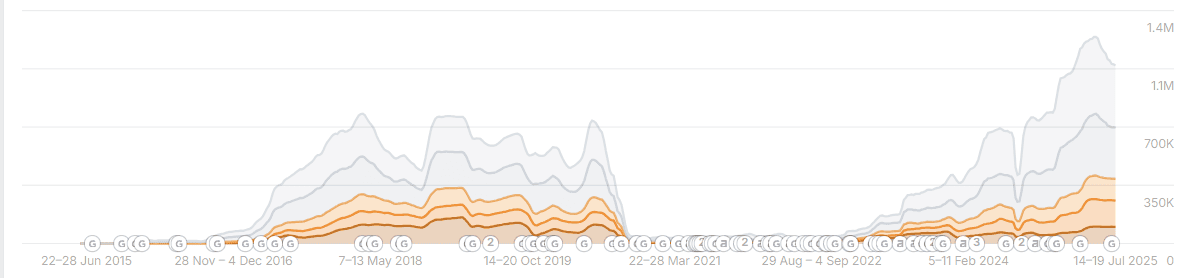
Not only did they see a 50% decrease in organic performance, the keywords completely disappeared from this section.
They did something… but what?
If we take a look at the top pages under the /templates/ structure, we get:

Throw the /templates/s/ back in and we see:

So whatever used to rank under /templates/ was killed off, and the performance was replaced by /templates/s/.
If we then take a look at an individual design page, we see a “noindex, nofollow”.
WHAT.
Their primary individual template page content is blocked from crawling & indexing?!
We can also see a little spike in /templates/search/ in 2019;

If we look a little further back, we see URLs like:
www.canva.com/templates/resumes/

www.canva.com/templates/presentations/

www.canva.com/templates/logos/

And the list goes on.
This is where they used to hold their template landing pages.
Taking a look at www.canva.com/templates/resumes/ now, we see a 301 redirect;
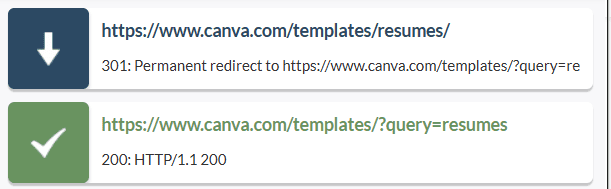
It points to https://www.canva.com/templates/?query=resumes – which is noindexed.
We can then see that https://www.canva.com/resumes/templates/ is a live page. So it looks like the old pages were completely killed off, redirected to a noindexed search page, and then recreated elsewhere.
I’d love to know why.
Looking back at the /templates/s/ folder though, one of the top URLs is https://www.canva.com/templates/s/birthday/, which looks like a manually set page;

But then looking at some others, we see URLs like https://www.canva.com/templates/s/wallpaper-purple/;

It looks like some sort of mass-page system that converts top search terms into clean URLs allowing for a large amount of pages to be created that fill in gaps that other page types can’t target.
We see over 6,000 ranking based on ahrefs data.
Possibly based on internal search data, and possibly also manually vetted or edited? Hard to say without knowing the system itself.
An automated rule here makes sense though – so when a keyword is searched X times in a given period, it automatically creates a /s/ URL and adds it into linking widgets & XML sitemaps.
Great strategy if that’s all true.
We’ll go into why they may de-index the individual templates shortly, but these /template/s/ pages are a great way to scale their keyword targeting options with related content.
2. Collections
These are Canva’s much cleaner version of search results, all sitting under their own folder structure.
It’s trickier to analyse the performance of all of them because there are so many sub-structures, so let’s narrow in on one: resumes;
www.canva.com/resumes/templates/

Under this page, you’ll find a series of sub-pages;

Each of these is linked through the “Other Resume Templates” widget that sits just below the main results;

You’ll notice Canva’s strategy on these pages mixes manual content with the template results;


They include a small text snippet above the results, something many sites skip but that adds useful context, and often a larger text block below the results.
Many of these snippets aren’t boilerplate – they’re custom per page and tailored to the subtopic.
But some pages, like https://www.canva.com/resumes/templates/music/, skip the below-results text block entirely and rely on a simpler, templated snippet above the fold.

All of these template collections roll up under parent pages like https://www.canva.com/resumes/
These parent pages collate all the value from the sub-pages, while also acting as a hub for other related content.
The parent pages take a bit more of a step back, and offer a wider selection of content, including links to blog posts along with FAQ;

Whilst very similar to the /templates/s/ pages, these appear more thought out and indepth with the others appearing more ad-hoc. Each page type serves its purpose.
3. Feature Landing Pages
These pages focus on specific Canva features – the tools that power the platform.
They all sit under /features/ and have seen steady, significant growth over time;

Examples include:
- https://www.canva.com/features/word-to-pdf-converter/
- https://www.canva.com/features/background-remover/
- https://www.canva.com/features/image-enhancer/
They contain standard landing-page style content, heavily linking between the different feature pages.
At first glance, they seem simple – just product pages for individual tools.
But there’s more going on here.
Each of these pages targets task-based search intent. Someone searching for “Word to PDF converter” or “remove background from photo” isn’t necessarily looking for Canva yet. They’re looking for a solution to a very specific problem.
These pages are Canva’s way of meeting those users exactly where they are.
Here’s why they work:
- They intercept high-intent searches – people searching for a tool are often ready to try one immediately.
- They introduce Canva as the solution – the page explains the tool, shows how it works, and lets the user try it right away.
- They act as soft onboarding – users might start by removing a background for free, then end up signing up for Canva to unlock more features.
It’s classic product-led SEO:
- Solve a problem first
- Introduce the platform second
- Upsell naturally after the user sees value
The brilliance of this approach is that every feature page isn’t just a one-time touchpoint. It’s a gateway into Canva’s ecosystem.
Someone who lands on “Word to PDF converter” might not know Canva makes posters, resumes, or social graphics. But once they use one feature, they’re far more likely to explore the rest.
4. Create Landing Pages
The /create/ pages are another core pillar of Canva’s SEO strategy – and a big part of their success;
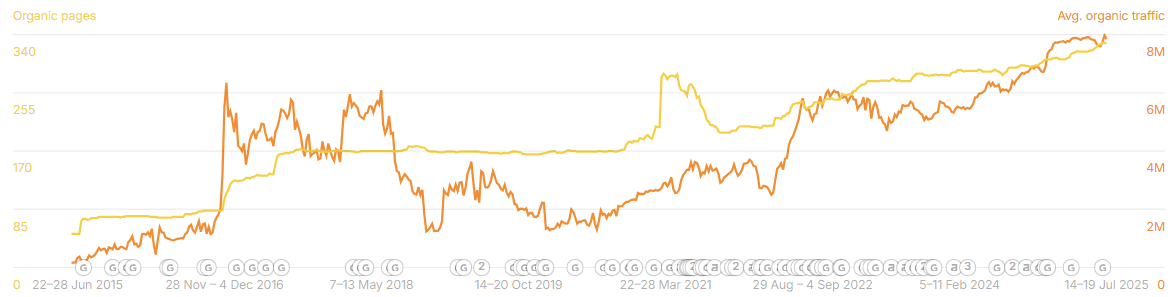
These are pages like;
- https://www.canva.com/create/logos/
- https://www.canva.com/create/resumes/
- https://www.canva.com/create/posters/
These pages are all manually curated, with well-written copy explaining what you can create and how Canva makes the process easier.
If we look at the “Create a Logo” page, we see that its breadcrumb parent is https://www.canva.com/logos/.
Interesting choice – they could have used something like /logos/create/ to nestle it more tightly in the structure, but instead they’ve set it up so the “logos” page is the parent hub, and “create” acts as an action-oriented entry point.
There are also a small hanful of child pages under the /create/logos/ like https://www.canva.com/create/logos/animated/ and https://www.canva.com/create/logos/badges/.
Not too sure of the methodology of what becomes a child and what doesn’t though, as they have other ‘logo’ pages that could have been sub-pages like https://www.canva.com/create/3d-logos/ and https://www.canva.com/create/logo-stickers/. Possibly just personal preference at time of creation.
The intent behind these pages is clear, though:
- They target users searching how to create something – a logo, a resume, a poster – and bring them straight into Canva’s flow.
- They double as soft tutorials and SEO landing pages, explaining the process but ultimately nudging users into starting a design on the spot.
Simple in concept, but highly effective.
5. Idea Landing Pages
A much smaller section of the site, but worth highlighting because it works a little differently from the others;
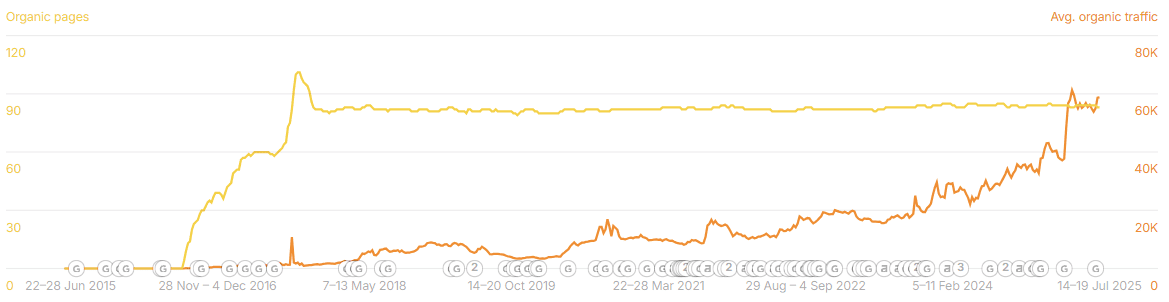
These are inspiration-driven pages – designed for people looking for ideas, not necessarily a specific design yet.
Examples include:
Instead of going after “create” intent (like create a unicorn birthday card or unicorn birthday card templates), these pages go a level higher, targeting broader searches like unicorn party ideas or circus party ideas.
It opens Canva up to a new audience – people who might not even be thinking about using Canva yet. They don’t even know if they want a design.
Performance here is much lower compared to their core sections, and it’s probably a “tyre kicker” low-conversion market, with users just browsing for inspiration.
But that’s the point. Even if this traffic converts later, not now, it puts Canva in the conversation early and earns them a seat at the table before the user even realises they need a design tool.
6. Colors
This is another slightly different section, with a slightly different audience, yet look at the performance;

It includes some big, high-value pages like:
- https://www.canva.com/colors/color-wheel/
- https://www.canva.com/colors/color-palette-generator/
- https://www.canva.com/colors/color-palettes/
…and then hundreds of long-tail pages like https://www.canva.com/colors/color-meanings/emerald-green/.
Not every visitor here is a ready-to-convert Canva user. A lot of this traffic is probably “softer” – people looking up the meaning of emerald green, or playing with colour palettes for fun.
But that’s not the point.
This section is about owning the entire topic of colour.
If you control the colour conversation – from what colours mean, to how to mix them, to tools like palette generators – you insert Canva into the research stage for every future designer, student, marketer, or hobbyist.
They might not want the product right now, but Canva is the name they’ll remember when they do.
7. The Blog
Falling under /learn/, Canva’s blog is exactly what you’d expect from a product-led giant – a massive resource hub;

It covers quite a bit, with ~800 ranking URLs and over 1,000 appearing as indexed.
Design tutorials, marketing advice, seasonal inspiration, trending styles, and even niche “how to” guides like:
- How to create a mood board
- 50 free Christmas fonts to give your designs a holiday twist
- How to build a successful startup pitch deck
On the surface, this looks like a standard content marketing blog. But look a bit closer, and it’s doing two very important things:
1. Owning the “how-to” space
Canva doesn’t just write about “design tips.” They write about anything remotely connected to design, branding, or content creation.
2. Feeding their internal linking machine
Almost every blog post is a spiderweb of links – pointing to relevant Create pages, Features pages, and even template collections.
Write about how to make a menu? Link to menu templates.
Write about how to design a logo? Link to the logo creation tool.
It’s clever because it doesn’t feel forced. The content genuinely helps the user, but it also quietly funnels them toward Canva’s product.
This blog isn’t just for traffic. It’s a massive internal linking engine.
And because the blog spans everything from “how to make Instagram stories” to “50 free christmas fonts” Canva effectively positions itself as a solution for every design scenario imaginable.
It’s not just blogging for SEO. It’s blogging as a strategic content hub – one that connects the top-of-funnel curiosity to bottom-of-funnel action.
8. Platform-specific pages
These target all the major platforms people create graphics for:
/instagram/

/facebook/
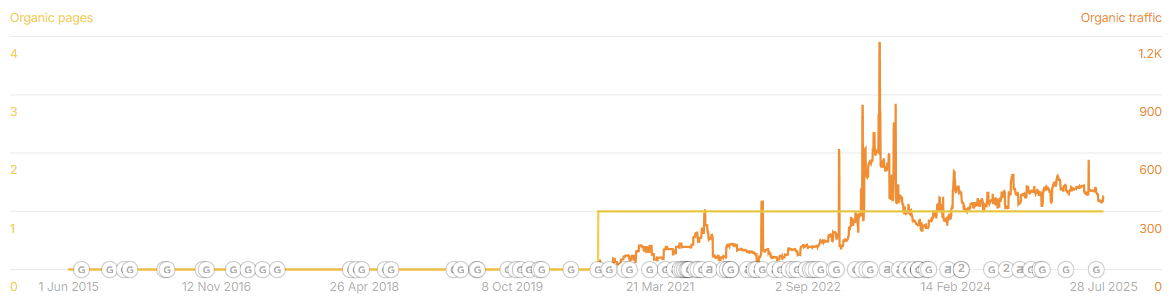
/youtube/

On the surface, these sound like goldmines – Canva ranking for platform-related searches makes perfect sense.
But in reality, they underperform compared to other sections.
Why? Because most users aren’t just searching for “Instagram” or “Facebook.” They’re searching for specific content types:
- Instagram posts
- Instagram stories
- Instagram reels
- YouTube thumbnails
- Facebook cover photos
And those queries don’t live under these parent pages. They mostly fall under the /templates/ folders, like:
canva.com/instagram-posts/templates/

canva.com/instagram-stories/templates/

canva.com/instagram-reels/templates/

Each of these URLs pulls in huge performance (as you can see in the graphs), because that’s where the search demand lives – users are searching for exactly what they want to create.
These parent pages essentially act as hubs, that;
- Help users discover everything Canva offers for that platform in one place.
- Boost internal linking to the real money pages (the templates).
- Send clearer topical signals to Google about Canva’s breadth for each platform.
They also serve an important role:
They capture platform-level intent – people searching for “Instagram design,” “Facebook templates,” or “YouTube graphics” – and funnel those users deeper into Canva’s ecosystem.
Whilst not overly performative in the scheme of things, they are filling the gap.
These filled gaps really do add up.
9. Other Landing Pages
Then there are the other landing pages – the catch-all category for everything that doesn’t fit neatly elsewhere.
These include sections like;
/solutions/

/education/
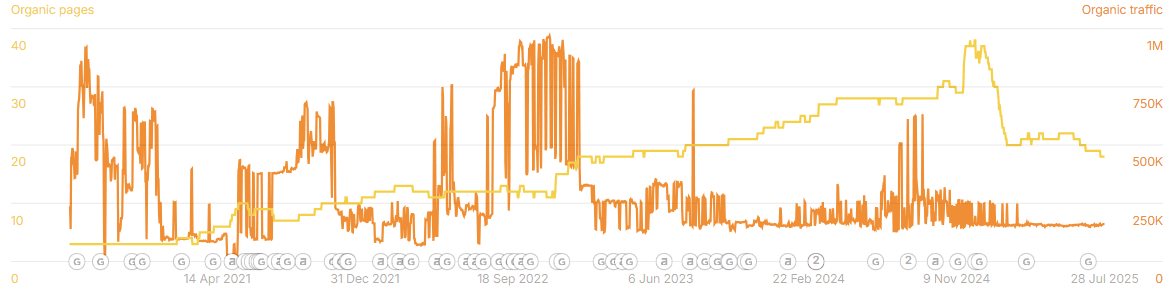
/business/

At first glance, these might look like minor side projects, but they’re actually quite strategic.
Each one targets specific audiences:
- /solutions/ is aimed at industries and use cases (think “solutions for marketers”, “solutions for small businesses”).
- /education/ taps into schools, teachers, and students, positioning Canva as an accessible design tool for the classroom.
- /business/ speaks directly to teams and organisations looking for Canva’s paid tiers and collaborative features.
There have been noticeable performance spikes in sections like /solutions/ and /business/, particularly after Canva killed off their old /for-teams/ subfolder.

It looks like they consolidated that content here, creating broader, audience-focused pages rather than product-centric ones.
The takeaway?
These pages aren’t about ranking for ultra-high-volume “template” keywords – they’re about owning intent segments.
By carving out sections for different user groups, Canva can:
- Speak directly to those users with tailored messaging.
- Capture B2B and institutional traffic (which is often more valuable).
- Funnel those visitors into the most relevant product paths.
Insights
Setup of pillar pages
One of Canva’s smartest SEO moves has been how they set up pillar pages – big, authoritative hubs that gather related content and funnel link equity.
Think of pages like /resumes/, /logos/, or /posters/. They’re not just standalone URLs – they’re anchors.
Each one pulls in:
- Links from blog posts, feature pages, and tools.
- Subpages like “music resumes” or “corporate logos”.
- Related search widgets and cross-links from other sections.
This structure makes the site easy for Google to understand. The “pillar” signals to search engines that it’s the definitive hub for that topic, while the subpages give depth and long-tail coverage.
It also gives Canva a framework to scale new categories. When they want to expand into, say, “event invitations”, they just spin up an /invitations/ hub, fill it with subpages and tools, and link to it everywhere.
For smaller sites, this is a key takeaway: you don’t need Canva’s scale, but you do need their structure. Build pillars, feed them links, and use them to organise your content.
Why do they block their core content?
Their core content is the designs, but they noindex, no follow them. Why?
There could be a few different reasons, but the main one that stands out? Significant quantities of highly duplicate content.
Look at the different design pages. What do you see as a difference between them?

It’s just the actual design. That’s it.
That is the difference between these pages, and at the scale of Canva we’re talking about tens to hundreds of thousands of these types of pages.
They have such a small quantity of keywords they could possibly rank for, across such a significantly large quantity of pages, it would be better to aggregate these designs under the collection-type pages.
As a competitor, this is your in.
Let’s quickly check Google for that second design, “Brown Minimalistic Photographer Business Card”;

Canva ranks #1 with the collection page that actually includes the mentioned business card design.
The following two have an individual page for the single design.
The other competitors have instead decided to go for it, and try to rank with the individual pages.
Is handling it this way what puts Canva at #1?
True, it’s a better UX experience like this… if it were a page full of brown minimalistic designs for photographers. But it’s not.
Would be interesting to compare this en masse across 1,000’s of keywords and see how Canva compares.
At Canva’s scale, even minor crawl inefficiencies or duplicate content could dilute their overall performance – so consolidating was likely a strategic move to sharpen topical relevance and authority.
International Domination
One of Canva’s biggest SEO advantages isn’t just the volume of content – it’s how global that content is.
Let’s look at some of their international sub-folders;

Roughly 60% of their traffic is tied to language- and market-specific subfolders. This expansion is a major reason Canva is operating at this scale today.
They use subfolders like /es_mx/, /fr_fr/, /de_de/, giving them a presence in dozens of markets. Add in properly implemented hreflang tags, and Google knows exactly which version to serve to which audience.
The result? Canva ranks in Spanish, French, German, Portuguese, and beyond – not just for branded terms, but for every variation of templates, designs, and tools those users search for.
What’s interesting is that Canva runs a market-based homepage, but for most other pages, they stick to language-based URLs. The structure works, and at their scale, there’s no reason to reinvent it.
ie the Canva homepage for me is https://www.canva.com/en_au/ but then all other URLs have no additional folder.
The lesson for the rest of us:
If your product or site has even the slightest global potential, start thinking about international SEO early. You don’t need Canva’s 40+ language rollout on day one – but even two or three key languages with proper translation & hreflang setup could open up entirely new traffic channels.
8. What We Can Learn From Canva
Canva isn’t just a design tool – it’s an SEO machine. But the best part? Much of what they do is adaptable, even for smaller sites.
This is what you can take and apply;
Start with a content model, then scale
Canva didn’t build random pages. They built templates, categories, and feature pages that all follow a repeatable model. Once the structure worked, they scaled it globally.
Build journeys, not silos
Canva’s pages map to the customer’s journey – from exploring ideas, to choosing a template, to finishing a design. Each stage flows into the next, turning casual browsers into active creators.
Don’t be afraid to deindex what doesn’t serve you
Canva noindexed their core design pages, the individual templates, because they were too thin, too duplicative, and didn’t serve SEO. Instead, they rolled that content up into stronger collection pages. Sometimes, removing pages is as powerful as adding them.
Don’t be scared of “manual” content at scale
Even with one of the largest automated SEO setups on the planet, Canva still uses handwritten content where it matters – like their Create pages, blog posts, and key category introductions. Automation gets you scale. Manual writing gives you depth and authority. Combine them.
Own the long-tail with specificity
They don’t just have “invitations”. They have “bachelorette party invitation template” pages. Each one captures a unique, high-intent search. You can go even deeper here.
Turn your product into landing pages
Canva’s product is the SEO. Every feature, every template, every tool is a page that ranks – and converts. Don’t just describe your offering, show it, filter it, and let it be found.
Let users generate SEO assets
User-created templates, shared designs, and collections feed Canva’s SEO. If users can contribute and share on your platform, you’ve got a content engine that never stops – you just need to control how it’s used.
Intent > format
Canva focuses on what people want to do – design, download, print, post – not just the keywords. They optimise for jobs-to-be-done, not just traffic.
Use SEO to feed product adoption
Most Canva pages don’t sell Canva directly – they let you use Canva. You land for a free template, you design something, and before you know it, you’re signed up.
The lesson? SEO isn’t just about traffic. It’s about building different entry points into your product.
9. Final Thoughts
Canva is one of the strongest examples of product-led SEO in the world.
They didn’t just write blog posts or spin up “SEO pages.” They built an entire content ecosystem around their product – and let that ecosystem feed discovery, engagement, and adoption.
They might not be the stock-standard programmatic play, and may be heavily held up with the more manual-style content, but they’re one to learn from.
Even if you don’t have Canva’s scale (or budget), there’s a lot to learn from their playbook.
Think about what you can:
- Template and repeat
- Aggregate and link together
- Open up to users to create and share
- Localise to grow beyond your borders
Canva proves that SEO doesn’t have to be a bolt-on. When it’s baked into your product from the start, it becomes a growth engine that keeps compounding.
Anyone building a tool, marketplace, or content-driven product can take something from Canva’s approach – and turn it into their own version of success.
